
Shape — Give it form
Reduces unwanted buildup and brings clarity and definition to your vocal.
Switch · Low / High, to match the voice
A lead-vocal processor built around six musical controls. Take a recorded voice toward a finished one without building a chain of separate tools.
Beta places are limited and offered by selection and availability.
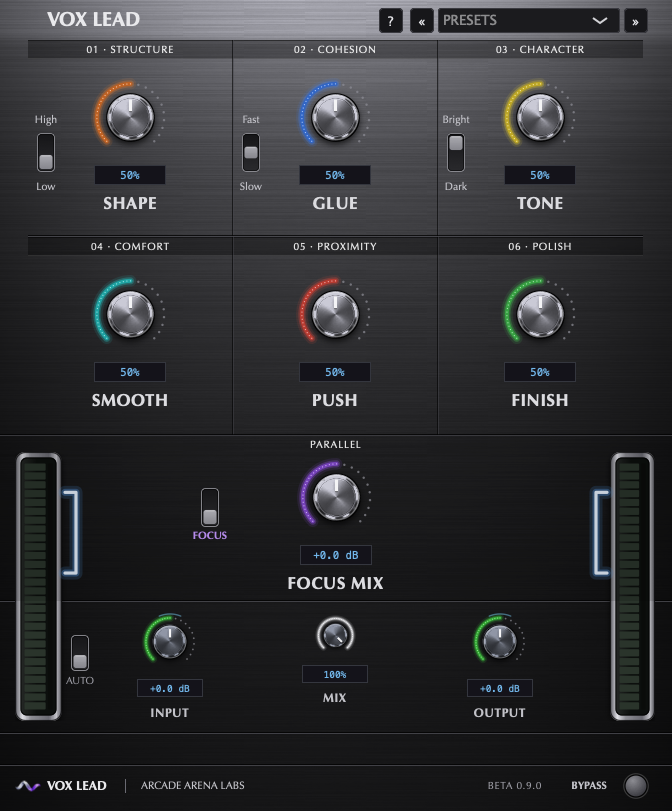
Work from form to finish. Each control is a musical direction, designed to work with the others — so small moves in several often beat one large move in one.
Reduces unwanted buildup and brings clarity and definition to your vocal.

Smooths out dynamic changes for a more cohesive, consistent performance.

Adds body, harmonic richness and musical character to your vocal.

Tames harshness, resonances and sibilance for a more comfortable sound.

Controls peaks and brings your vocal closer and more upfront in the mix.

Adds the final tonal polish for a refined, mix-ready vocal.

Focus is separate from the six controls. It is an optional layer of presence and density that you switch on and blend in to taste with Focus Mix. It is off by default, so the six controls always work on their own.

The plugin format used by Pro Tools.
The Audio Units format used by Logic Pro and other Audio Unit hosts.
The format used by many other DAWs.
Beta testers receive the installer and their activation details with their invitation. The public step-by-step guide will be published before the public release.
AAX, AU and VST3. VOX LEAD is currently in beta on macOS, and compatibility with specific hosts is still being confirmed.
No. It is one plugin with six musical controls — Shape, Glue, Tone, Smooth, Push and Finish — that are designed to work together.
An optional layer of presence and density, kept apart from the six controls. You switch it on and blend it in to taste with Focus Mix. It is off by default.
Yes. Bypass switches the processing off, and Mix blends between the original and the processed voice. Match the output level before you compare.
The current beta includes a couple of factory starting points you can load and adjust. Presets are starting points, not finished answers.
Yes, the controls can be automated from your DAW.
Send us a request with your DAW and the plugin format you use. Beta places are limited and offered by selection and availability, so a request does not guarantee access.
These have not been announced yet. We will publish them with the public release.
Beta testers receive them with their invitation. The public guide will be published before the public release.
Interested in trying it? Send a request with your DAW and the plugin format you use. Beta places are limited and offered by selection and availability, so a request is not a guarantee of access.
Request beta access